NPCSpawn Framework: Optimized gmod NPC Spawn Editor - scripts
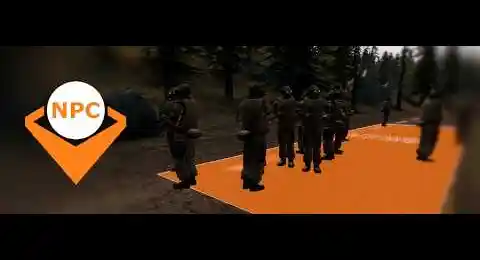
NPCSpawn is a GMod 2026 addon that replaces native entities such as npc_maker or info_npc_spawn_destination with a logical, dynamic and ultra high-performance spawn system. Create and fully control NPC spawn zones with ease: types, factions, behaviors, respawn cycles, rally points, all without physical entities or server overhead. GMod native NPC spawning is heavy and limited. NPCSpawn replaces it with a faster, cleaner and fully customizable solution, editable in real time without any mapping required.
❮
❯

Description of NPCSpawn Framework: Optimized gmod NPC Spawn Editor
Table of Contents:- 📙 Introduction to NPCSpawn Framework, advanced NPC & Nextbot spawn editor
- 🧠 Dynamic, conditional and event-driven spawn logic
- 🔬 AI routine optimization through a non-physical entity architecture
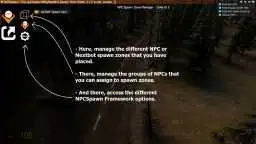
- ⚙️ NPCSpawn interface, global management of virtual zones
- 🧰 Visual editing SWEP, real-time zone creation
- 🎯 Advanced spawn filters and conditions
- 📜 Expert configuration, priorities, cycles and controls
- 🌪️ Server optimizations and removal of native spawns
- 🗜️ Memory footprint
- 🧩 Norda Suite, a modular ecosystem for map building
📙 Introduction to NPCSpawn Framework
NPCSpawn is a modern spawn management framework for NPCs and Nextbots in Garry's Mod. It fully replaces legacy systems such as npc_maker, info_npc_spawn_destination, and inherited spawn scripts by removing any dependency on physical entities required for operation.
Built on a 100 % virtual logic, NPCSpawn operates entirely in memory, without any fixed spawn points placed on the map. The result is fewer entities, fewer conflicts, and increased stability. Even NPCs and Nextbots benefit from a cleaner environment, as unnecessary elements are removed from their AI search space.
As the direct successor to Gmod NPCs Spawn Point Creator (2021), this 2026 version was designed for RP, PVE, sandbox, and scripted servers requiring precise control over NPC and Nextbot density, behavior, and rotation.
The system acts as a complete, gamemode-independent replacement, faster, cleaner, and fully focused on server optimization.
🧠 Dynamic and conditional spawn logic
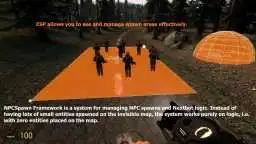
NPCSpawn zones are entirely logical, calculated in real time, and free of any mapped entities.
Each zone controls NPC types, maximum quantities per zone, and their appearance or removal conditions.
Typical use cases:
-You can choose which NPCs can spawn during the day or at night (if NWeather is present in the installation).
-Patrol zones activated based on player presence.
-Adaptive respawn tied to scenarios or progression.
-Dynamic events, invasions, or enemy waves.
-Automatic rotation of spawn points to simulate reinforcements.
The complete absence of npc_maker and info_node entities drastically reduces server load, prevents duplication, and improves overall smoothness.
🔬 AI routine optimization through a non-physical entity architecture
In the Source engine, NPCs and Nextbots continuously analyze their environment to detect players, potential targets, or points of interest.
This scan is not limited to visible entities: all entities present on the map are evaluated, including invisible, non-interactive, or purely technical ones.
By completely removing physical entities related to spawn systems, NPCSpawn drastically reduces the number of entities evaluated during these scan phases.
Spawn functionality remains intact, as it is replaced by pure Lua logic, stored in memory and executed only when necessary.
This philosophy, applied across all my scripts, aims to preserve advanced features while eliminating unnecessary server-side entities.
The result is a measurable reduction in internal iterations, fewer useless AI calculations, and a direct improvement in server performance, especially in environments heavily populated with NPCs and Nextbots.
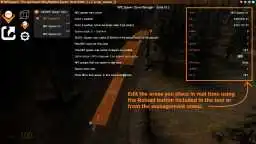
⚙️ NPCSpawn interface, centralized management
A single menu provides centralized and complete administration of spawn zones:
-Creation, editing, and removal of NPC and Nextbot zones.
-Definition of classes, models, weapons, factions, and AI behaviors.
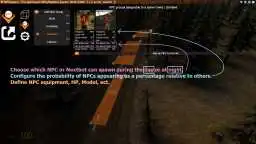
-Advanced priority management, with per-NPC and per-spawn-group probability rates, removing the need to manually edit individual spawn points.
-Limitation of active entities per zone, as well as a global cap across the entire map.
-Automatic or manual triggering of spawns on a per-zone basis.
-Targeted removal of NPCs originating from a specific zone, without affecting NPCs spawned in other zones.
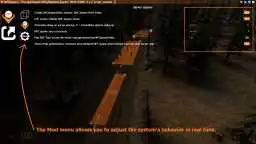
🧰 Real-time visual editing SWEP
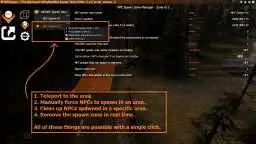
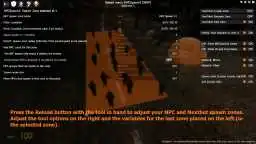
A dedicated SWEP allows zones to be placed and modified directly in-game, without Hammer or native entities.
Zones can be cubic, spherical, flat, or volumetric, and adjusted instantly.
Controls:
-Reload: tool main menu.
-Left click: P1 point.
-Right click: P2 point and volume creation.
-Left click on zone: move.
-Right click on zone: delete.
-Buttons in the top-left corner to switch between other build tools.
Features:
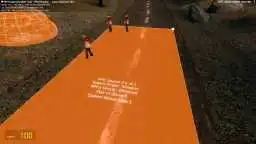
-3D admin ESP visualization of zones.
-Fixed or random spawn direction.
🎯 Advanced spawn filters and conditions
Each zone can precisely filter entities:
-Specific NPC or Nextbot classes.
-Spawn orientation and angle.
-Logical conditions: player presence, timer, Lua trigger (distance-based).
📜 Expert configuration and priorities
NPCSpawn provides fine-grained per-zone control:
-Simultaneous NPC limits.
-Configurable respawn delay.
-Random or targeted rotation between zones.
-Activation via logic, command, or event.
-Exclusion zones to prevent abusive spawning near players.
🌪️ Server optimizations and removal of native spawns
🌪️ Optimization #1
Automatic removal at startup of native spawn entities (npc_maker, ai_goal_*, info_npc_spawn_destination).
Benefits:
-Lighter server environment.
🌪️ Optimization #2
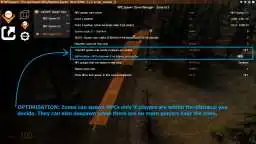
Zones can be automatically enabled or disabled based on player proximity, using a configurable detection radius, reducing unnecessary calculations. This is useful if you want NPCs only where actual activity occurs on your server. Poorly optimized NPCs should not exist in inactive areas.
🌪️ Optimization #3
Automatic despawn of NPCs in inactive zones, significantly reducing CPU load.
🗜️ Memory footprint
Addon size:
Client: 35 KB
Server: 17 KB
Workshop (icons): 7 KB
🧩 Norda Suite, a modular ecosystem for map building
NPCSpawn Framework is a natural extension of the lineup and further strengthens an ecosystem already designed for clean, modular, and high-performance map building on GMod. It works in perfect synergy with NPlayerSpawn for advanced player spawn management, NRestrict for precise zone access control, NSafeZone for optimized area security, NSoundscape Creator for custom soundscape creation, and GhostEntity for high-performance map decoration.
The objective is simple, to provide a coherent and interconnected toolset that accelerates the creation of solid, readable, and fully optimized maps, while maintaining a clean and controlled workflow.
WIKI & F.A.Q

☰ 1. Installation of NPCSpawn Framework: Optimized gmod NPC Spawn Editor
Path: garrysmod/addons/norda_npcspawn_framework
☰ 2. Where can I find resources and materials in norda_npcspawn_framework?
- The AddWorkshop function is automatically added to the script server file and can be deactivated from the configuration file. : resource.AddWorkshop( 3673517116 )
- To add gmod workshop resources to your collection : NPCSpawn Framework: Optimized gmod NPC Spawn Editor [Content Only] | Gmod Workshop
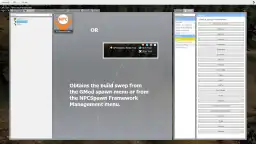
☰ 3. How do I open the interface to manage NPCSpawn Framework?
Or from the shortcut menu in Nor Admin | gmod Administration Suite
☰ 4. How to create a spawn zone for NPCs or Nextbot?
1. Left-click to place point P1
2. Right-click to place P2 and generate the volume
3. Reload to open the edit menu
4. Configure the zone
The zone becomes active immediately if the system is enabled.
☰ 5. Can spherical and cubic zones be created?
If P1 and P2 are defined, the zone becomes cubic/volumetric.
You can adjust the size in real time.
☰ 6. How can I limit the number of NPCs in an area?
- A maximum NPC count per area
- A spawn wave size
- A configurable global server limit
The system strictly adheres to these limits.
☰ 7. Can spawning be prevented if no players are nearby?
This is one of the major optimization levers.
☰ 8. Can we choose which NPCs spawn during the day or at night?
- Spawn allowed during the day
- Spawn allowed at night
Compatible with NWeather if installed.
☰ 9. How do probabilities work?
Example:
Zombie A: 70%
Zombie B: 20%
Zombie C: 10%
The system distributes dynamically according to these ratios.
☰ 10. Can we modify the HP or model of an NPC?
- Custom HP
- Custom Model
- Custom Skin
- Custom SWEP
- Ability to spawn during the day or at night
☰ 11. How do I force a spawn in an area?
- Force Spawn Area
This manually triggers the spawn logic for the selected area.
☰ 12. How do I remove NPCs from a specific area only?
☰ 13. Is NPCSpawn compatible with all game modes?
It works in sandbox, DarkRP, or without a game mode without any issues.
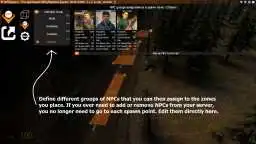
☰ 14. Can we manage multiple groups of NPCs?
You define groups:
- Zombies
- Combines
- Civilians
- Etc...
Then you assign a group to an area. Modifying a group updates all areas that use it.
This saves a lot of time, unlike my old system.
☰ 15. Is it compatible with Nextbots?
The spawn logic remains the same.
☰ 16. Can a zone be temporarily disabled?
☰ 17. Can we create waves of enemies?
- Spawn wave size
- Max NPC zone
- Spawn delays
You can simulate gradual reinforcements.

1772141595 ago | Purchased: 2026-02-26

Creator: Norda Scripts
| Sales | 15 |
| Published | 8 months |
| Last update | |
| Version | version 1.2 |
| DRM | Yes |
| Categories | Gmod addons |
| Requirements | Garry's Mod Server |
| Languages | 🇬🇧 🇫🇷 |
| Availability | Instant access |
| Delivery | Digital download |
| Refund | Before download |
| Admin DarkRP Entities Optimisation Gameplay Management Allgamemode Weapon Standalone | |